

Identity and authorization for user-delegated agents
Agents act for a signed-in user with access scoped to one service. Your existing OAuth server stays in place, and merchant credentials stay server-side, never with the agent.
Building needs an Evaluation Console account. Self-serve sign-up isn't confirmed for this release, so request evaluation access if you can't create one.
 Muse
MuseMuse calls Northwind's MCP service and gets a 401 that names AIGW as the authorization server.
- mcp.northwind.example→ POST /mcp tools/call reorder← 401 resource_metadata names AIGW
Illustration with example values. Muse is Meta's personal agent; Northwind is a sample merchant.
Pick the part you're building
One OAuth flow for every AIGW-protected service
Your agent finds the authorization server from the 401, registers itself and runs authorization code with PKCE. There is no client to pre-register with each merchant and no merchant credential to store. You hold an AIGW token scoped to one Resource and one user.
- Follow resource_metadata from the 401
- Register with Dynamic Client Registration
- Authorize with PKCE, exchange the code
POST /mcp HTTP/1.1Host: mcp.example.comAuthorization: Bearer <AIGW access token>Content-Type: application/json{ "jsonrpc": "2.0", "id": 1, "method": "tools/list", "params": {}}Know who is behind every agent call
Not a shared API key
An API key says nothing about who asked. An AIGW token names one user and one approved agent, scoped to one Resource.
Not the user's real token
Handing your access token to an agent puts it in prompts and logs. The agent holds an AIGW token, and yours stays in AIGW's vault.
Not a rebuild of your IAM
Agent registration, consent and the token vault run in AIGW. Your OAuth server stays the source of truth for users and scopes.
Runs on your existing OAuth server
What stays the same
- Your OAuth 2.0 or OpenID Connect server stays the source of truth for users and scopes.
- Your backend API keeps accepting access tokens from your own server.
- Agents use standard OAuth clients with Dynamic Client Registration (RFC 7591) and PKCE.
What you configure
- Your authorization server trusts the AIGW Resource issuer and JWKS, gets a client for AIGW with signed JWT authentication, and defines the scopes AIGW requests.
- You decide how AIGW users match your users: email, pre-linked accounts or your own provisioning.
- Your MCP or UCP service returns a 401 with Protected Resource Metadata (RFC 9728) and redeems tokens with its Proxy token.
Verified in this release
- Keycloak 26 with private_key_jwt (RFC 7523), with a step-by-step guide.
- Other OAuth servers: the protocol contract is documented. Auth0 and Okta walkthroughs are not available yet.
- RFC 8693 token exchange is unverified. client_secret_basic is not supported.
# 401 from the service points the agent to this document (RFC 9728)GET /.well-known/oauth-protected-resource HTTP/1.1Host: mcp.example.com{ "resource": "https://mcp.example.com", "authorization_servers": ["https://api.aigw.eval.loginid.ai/<RESOURCE_ID>"]}Evaluation environment hosts. The first four requests are standard OAuth. Redeem is AIGW's API.
Integrate LoginID AIGW (Agent Gateway), the OAuth authorization server for user-delegated AI agents.1. Read the docs index: https://agentauth-signed-human-c-1f4a16f1.ploy.build/llms.txt Every docs page also returns Markdown when requested with "Accept: text/markdown".2. Work out which role this codebase plays and follow that guide. I expect it is an agent or agent app. - Agent or agent app: https://agentauth-signed-human-c-1f4a16f1.ploy.build/docs/guides/agents (fastest path: https://agentauth-signed-human-c-1f4a16f1.ploy.build/docs/quickstart) - MCP or UCP service: https://agentauth-signed-human-c-1f4a16f1.ploy.build/docs/guides/mcp-ucp-services - Merchant OAuth authorization server: https://agentauth-signed-human-c-1f4a16f1.ploy.build/docs/guides/authorization-server3. Build against the Evaluation environment: https://api.aigw.eval.loginid.ai This needs evaluation access to the AIGW Console. If I have no Console credentials, stop and tell me.4. Check https://agentauth-signed-human-c-1f4a16f1.ploy.build/docs/release-status before relying on a feature. Do not use anything marked Unsupported. Test anything marked Unverified end to end.5. Follow https://agentauth-signed-human-c-1f4a16f1.ploy.build/docs/best-practices: discover the authorization server from the 401, use PKCE with S256, keep tokens out of model context, and redeem merchant tokens on the server only. If redemption returns 410 reauthentication_required, send the user through authorization again.6. Never invent endpoints, field names or error codes. Where the docs say "Not documented", stop and ask me.Paste into a coding agent that can fetch URLs. Pick a different role above to retarget it.
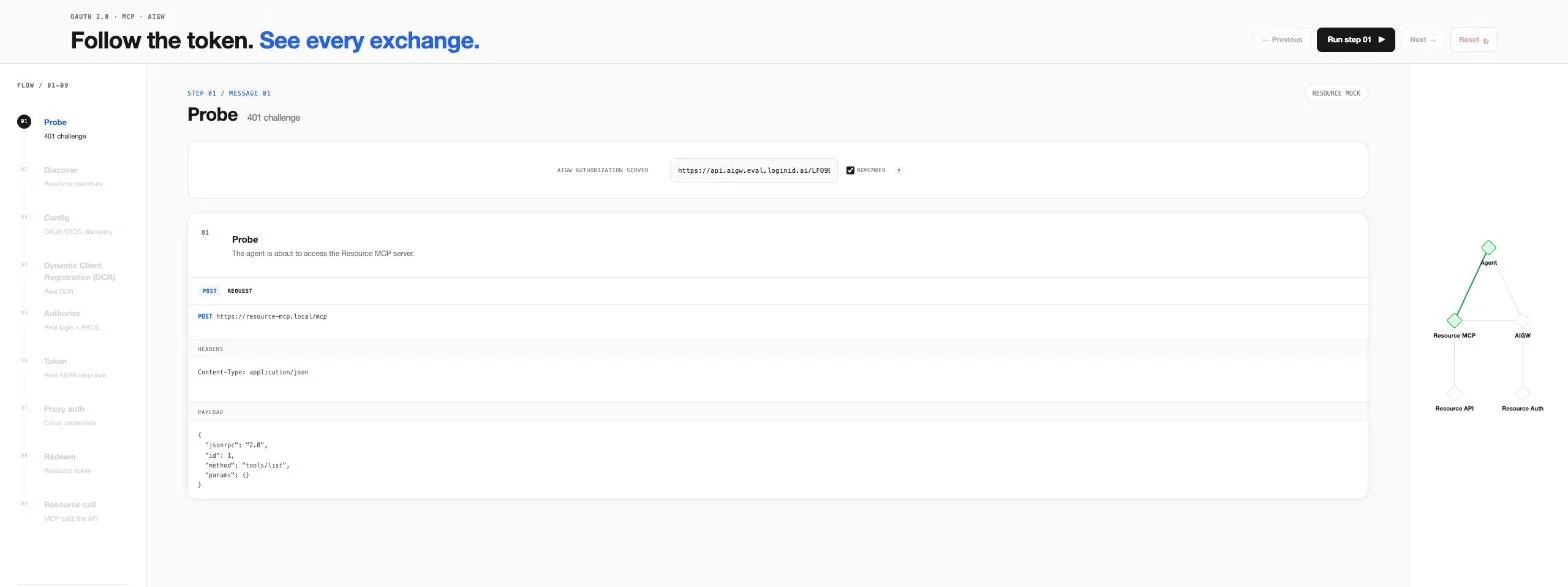
Run the full flow in the Playground
Nine stages against a live Evaluation Resource, with the request, response and tokens shown at each one. Use it to learn the flow, then to test your own Resource's configuration.
- Probe
- Discover
- Config
- Register
- Authorize
- Token
- Proxy auth
- Redeem
- Resource call
The agent never holds the merchant's token
AIGW gives the agent its own token. The merchant's access token stays in AIGW's vault and is released only to your service, server-side.
Read the diagram as text
- 1 User to Agent: Prompt.
- 2 Agent to UCP / MCP Proxy: Search product, without a token.
- 2' UCP / MCP Proxy to Agent: Return 401 and resource_metadata.
- 3 Agent to LID AIGW: Visit the URL dedicated to this merchant, with an HTTP signature.
- 4 User to LID AIGW: Authenticate and authorize.
- 5 LID AIGW to Merchant Token Exchange: Token exchange to get the merchant access token and refresh token.
- 6 LID AIGW to LID Token Vault: Store the merchant access token and refresh token.
- 7 LID AIGW to Agent Callback: Callback with access code.
- 8 Agent Callback to LID Token Endpoint: Get LID access and refresh tokens.
- 9 Agent Callback to Agent: Return tokens.
- 10 Agent to UCP / MCP Proxy: Search product with the LID token.
- 11 UCP / MCP Proxy to LID Token Vault: Get the merchant access token.
- 12 UCP / MCP Proxy to Merchant Backend: Search with the merchant access token.
- 13 LID Token Vault to Merchant Token Endpoint: Refresh if the access token expired.
The agent holds an AIGW token
Scoped to one Resource and one user. The merchant API does not accept it.
Your service redeems the merchant token
Redemption needs the AIGW token plus the service's Proxy token from the same Project. A leaked agent token alone returns nothing.
The merchant trusts AIGW, not agents
The merchant's server verifies AIGW's signed assertions against its JWKS and issues nothing to agents directly.
Six rules before you go to production
The short version of the best practices guide. The production checklist covers the rest: environments, logging, rate limits, rotation and revocation.
Start from the 401, not a hard-coded URL
The 401 names the authorization server, so agents keep working when a Resource changes.
Ask for scopes at authorization, never at registration
Each token carries only what the user approved.
Keep tokens out of the model
Prompts and tool output end up in logs, traces and later turns.
Redeem the merchant token on the server
An agent that can read it can call the merchant API directly, skipping your service's checks.
Trust keys by JWKS URL
New signing keys are picked up without a code change.
Retry 5xx with backoff, never invalid_grant
Authorization codes are single use.
Standards supported in this release. RFC 8693 and RFC 7009 status is on release status.
- OAuth 2.0
- OpenID Connect
- RFC 9728
- RFC 8414
- RFC 7591
- RFC 7636
- RFC 7523
Get an AIGW token in four requests
The quickstart covers discover, register, authorize with PKCE and exchange, with curl and Node samples against the Evaluation environment.