

Protect an MCP or UCP service
Publish resource metadata, challenge with 401, and redeem the merchant token server-side.
Checked against the Evaluation environment, Console 0.10.1 / 0.14.1, on October 19, 2026. Release status
This guide is for teams that build or operate an MCP or UCP service. You protect your endpoint so agents are sent into AIGW authorization, accept the AIGW access token they return with, and redeem the merchant access token on your server. The agent never sees the merchant's credentials.
What your service does
| Party | Responsibility |
|---|---|
| Your service | Publishes resource metadata, challenges with 401, validates the AIGW token, redeems and uses the merchant token. |
| AIGW | Authenticates the user, applies agent policy, issues the AIGW token, and vaults the merchant token. |
| The agent | Discovers AIGW, registers, runs Authorization Code with PKCE, and sends the AIGW token as a bearer token. |
If the merchant runs its own MCP/UCP service, the operator and merchant are the same organization. If a third party runs it, that provider normally does these steps and hands the merchant the authorization server configuration it needs. See Configure your authorization server.
Before you start
- A Project with a Token exchange Resource. Create both in the Console. Token exchange is the Resource kind for agents calling an MCP/UCP or merchant service on a user's behalf. Setup is in Console configuration.
- The Resource indicator. The exact identifier (audience) of the merchant API, for example
https://api.example.com/search. You get it from the merchant's API or IAM owner and send the same value at redemption. - The Reference screen values. After you create the Resource, its Reference screen lists the per-Resource authorization server, the JWKS URI and a downloadable
oauth-protected-resource.json. - A merchant authorization server that trusts AIGW. Without it, AIGW can't obtain a merchant token for the user.
Protect the endpoint
Publish Protected Resource Metadata
Who: MCP/UCP operator
Publish an OAuth Protected Resource Metadata document (RFC 9728) at a stable HTTPS URL, commonly https://mcp.example.com/.well-known/oauth-protected-resource. Point authorization_servers at the per-Resource AIGW authorization server. You can start from the downloaded oauth-protected-resource.json.
{ "resource": "https://mcp.example.com", "authorization_servers": [ "https://api.aigw.eval.loginid.ai/<RESOURCE_ID>" ]}resourcestringRequired- Identifier or URL of your MCP/UCP service. Use your own deployment URL.
authorization_serversstring[]Required- Authorization servers allowed to authorize access. Use the Authorization server value from the Resource's Reference screen, for example
https://api.aigw.eval.loginid.ai/<RESOURCE_ID>.
Return a 401 to unauthorized agents
Who: MCP/UCP operator
When a request has no acceptable AIGW access token, answer 401 Unauthorized with a WWW-Authenticate header whose resource_metadata points at your metadata document. The agent fetches it to find AIGW.
HTTP/1.1 401 UnauthorizedWWW-Authenticate: Bearer resource_metadata="https://mcp.example.com/.well-known/oauth-protected-resource"After the user authorizes, the agent retries with the AIGW token:
POST /mcp HTTP/1.1Host: mcp.example.comAuthorization: Bearer <AIGW_ACCESS_TOKEN>Validate the AIGW token
Who: MCP/UCP operator
AIGW tokens are JWTs issued by the core issuer. Read issuer and jwks_uri from the per-Resource discovery document at https://api.aigw.eval.loginid.ai/<RESOURCE_ID>/.well-known/openid-configuration and verify the signature with that key set.
{ "iss": "https://core.api.aigw.eval.loginid.ai/", "aud": ["<resource indicator>"], "sub": "sub_<opaque id>", "ext": { "acr": "<...>:al2", "amr": ["mfa", "kba"], "agent": { "...": "client ID, domain, name, verifications" }, "project_id": "<your project id>" }}issmust equal the discoveryissuer(the core AIGW issuer).audmust contain your Resource indicator. This is the merchant API's indicator, not theresourceURL in your metadata document.expmust be in the future. Answer expired tokens with the same401challenge.ext.project_idnames the Project. Redemption only works when it matches your Proxy client's Project.
Standard JWT checks
AIGW doesn't publish a validation checklist for services in this release. The checks above are standard JWT validation applied to claims AIGW documents. Use the core JWKS here, not the per-Resource JWKS: the per-Resource keys sign the assertions AIGW sends to the merchant authorization server.
Get the merchant token
Your server now holds the user's AIGW token. To call the merchant API, trade it plus your own Proxy token for the merchant access token.
Create a Proxy client
Who: MCP/UCP operator
In the Console, open your Project, then Proxy clients, then Generate new client. A Proxy client is the machine credential your backend uses to authenticate to AIGW. It belongs to one Project.
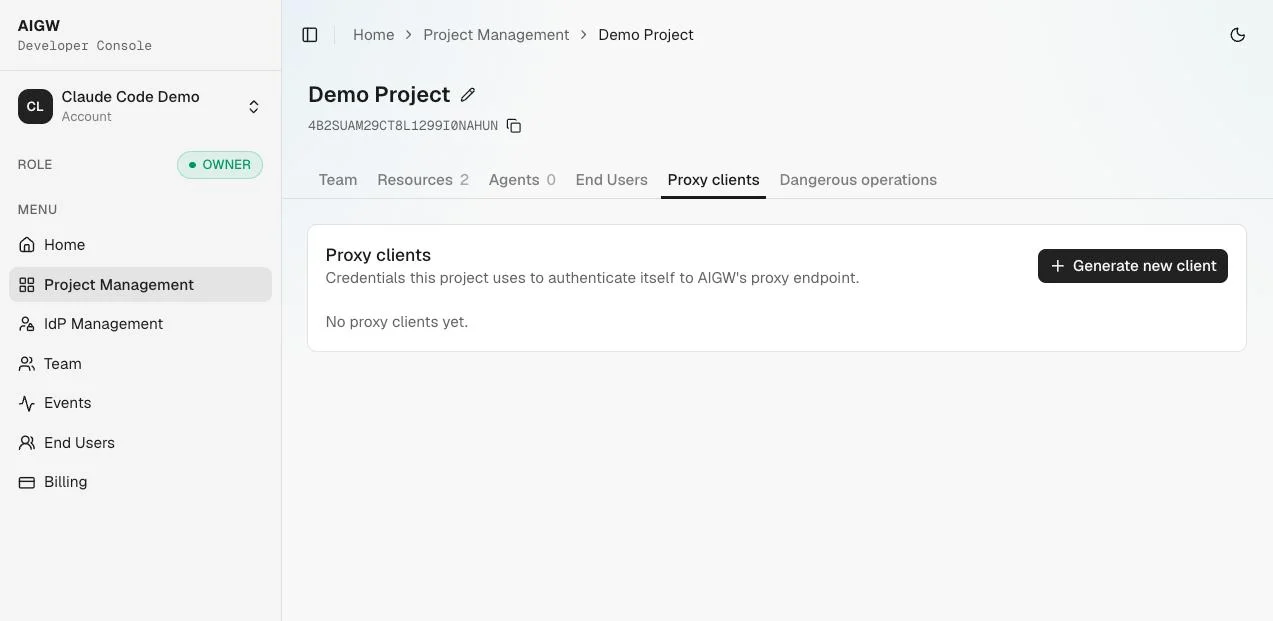
Save the client ID and secret into your server's secret store:
AIGW_PROXY_CLIENT_ID=...AIGW_PROXY_CLIENT_SECRET=...The secret is shown once
It can't be retrieved later. If you lose it, generate a new client and revoke the old one. A Project can hold several Proxy clients, so you can rotate without downtime.
Get a Proxy token
Who: MCP/UCP operator
Exchange the Proxy client for a Proxy token with client_credentials at the core token endpoint, using HTTP Basic authentication.
POST https://core.api.aigw.eval.loginid.ai/oauth2/tokenAuthorization: Basic base64(<PROXY_CLIENT_ID>:<PROXY_CLIENT_SECRET>)Content-Type: application/x-www-form-urlencodedgrant_type=client_credentialsThe token is a one-hour bearer token (expires_in: 3599). Cache it and reuse it until shortly before it expires instead of requesting one per agent call.
Redeem the merchant token
Who: MCP/UCP operator
Call the credential redemption endpoint with both sides of the context: the user's AIGW token as the bearer token and your Proxy token in X-Proxy-Token.
POST https://api.aigw.eval.loginid.ai/api/credentials/tokenAuthorization: Bearer <AIGW_ACCESS_TOKEN>X-Proxy-Token: <PROXY_TOKEN>Content-Type: application/json{"resource":"https://api.example.com/search"}AuthorizationheaderRequiredBearerplus the user's AIGW access token from the agent's request.X-Proxy-TokenheaderRequired- Your Proxy token. Identifies which backend is redeeming.
resourcestringRequired- The Resource indicator configured on the Token exchange Resource. It must match exactly.
On success, AIGW returns the merchant token in access_token. expires_at (RFC 3339) and scopes can be absent. The merchant refresh token is never returned. The full contract is in the redemption reference.
- The AIGW token and the Proxy token must belong to the same Project.
- Send the Proxy token bare in
X-Proxy-Token, without aBearerprefix. - The Resource must exist in that Project.
- A missing
AuthorizationorX-Proxy-Tokenheader returns400.
AIGW obtains the merchant token from the merchant's authorization server when the user finishes signing in, and caches it by Project, user subject, Resource and login ID. Redemption reads from that cache and refreshes lazily near expiry with the merchant's refresh token. If there is no refresh token, or the merchant rejects it, redemption returns 410 with reauthentication_required and the user must authorize again. Provisioning at sign-in is best effort: if the merchant authorization server rejects AIGW, sign-in still succeeds but redemption has no merchant token to return.
Release status
Redemption on a preconfigured private_key_jwt Keycloak Resource is Supported, recorded in an earlier walkthrough and not rerun in the October 17, 2026 recheck. Redemption against a Resource you configure yourself is Unverified in this release. The Console's Test exchange button is Unsupported; use the Playground's Redeem step to test instead.
Call the merchant API
Who: MCP/UCP operator
Use the merchant token exactly as the merchant API's normal bearer-token contract expects.
GET /products?q=shoe HTTP/1.1Host: api.merchant.exampleAuthorization: Bearer <MERCHANT_ACCESS_TOKEN>The merchant API sees a token issued by its own authorization server. That token carries the user and the acting agent, so the merchant can audit and authorize agent-initiated actions.
Express middleware sketch
One file that wires the steps together with Express and the jose library. It is a sketch built only on the documented contract, not an official SDK.
// aigw.mjs// SKETCH. Built only on the contract AIGW documents for this release.// Not an official SDK. Review error handling, timeouts and logging before production.import express from "express";import { createRemoteJWKSet, jwtVerify } from "jose";const MCP_ORIGIN = "https://mcp.example.com";const PRM_URL = MCP_ORIGIN + "/.well-known/oauth-protected-resource";const AIGW_AS = process.env.AIGW_AUTHORIZATION_SERVER; // https://api.aigw.eval.loginid.ai/<RESOURCE_ID>const RESOURCE = process.env.AIGW_RESOURCE_INDICATOR; // e.g. https://api.example.com/searchconst TOKEN_URL = "https://core.api.aigw.eval.loginid.ai/oauth2/token";const REDEEM_URL = "https://api.aigw.eval.loginid.ai/api/credentials/token";// Discovery gives the core issuer and JWKS that sign agent-facing AIGW tokens.const discovery = await fetch(AIGW_AS + "/.well-known/openid-configuration").then((r) => r.json());const jwks = createRemoteJWKSet(new URL(discovery.jwks_uri));function challenge(res) { res.set("WWW-Authenticate", 'Bearer resource_metadata="' + PRM_URL + '"'); return res.status(401).end();}// 1. Validate the agent's AIGW token, or send the agent into discovery.export async function requireAigw(req, res, next) { const [scheme, token] = (req.get("authorization") || "").split(" "); if (scheme !== "Bearer" || !token) return challenge(res); try { // jwtVerify checks the signature and exp, plus the issuer and audience given here. const { payload } = await jwtVerify(token, jwks, { issuer: discovery.issuer, audience: RESOURCE, }); req.aigw = { token, claims: payload }; return next(); } catch { return challenge(res); }}// 2. Proxy token: client_credentials with HTTP Basic, cached until near expiry.let proxy = { token: "", expiresAt: 0 };async function getProxyToken() { if (proxy.token && Date.now() < proxy.expiresAt - 60_000) return proxy.token; const basic = Buffer.from( process.env.AIGW_PROXY_CLIENT_ID + ":" + process.env.AIGW_PROXY_CLIENT_SECRET, ).toString("base64"); const r = await fetch(TOKEN_URL, { method: "POST", headers: { Authorization: "Basic " + basic, "Content-Type": "application/x-www-form-urlencoded", }, body: "grant_type=client_credentials", }); if (!r.ok) throw new Error("Proxy auth failed: " + r.status); const body = await r.json(); // standard OAuth 2.0 token response proxy = { token: body.access_token, expiresAt: Date.now() + body.expires_in * 1000 }; return proxy.token;}// 3. Redeem the merchant token for this user and Resource.async function redeemMerchantToken(aigwToken) { const r = await fetch(REDEEM_URL, { method: "POST", headers: { Authorization: "Bearer " + aigwToken, "X-Proxy-Token": await getProxyToken(), "Content-Type": "application/json", }, body: JSON.stringify({ resource: RESOURCE }), }); // 410 reauthentication_required: the user must authorize again. if (r.status === 410) throw new Error("reauthentication_required"); if (!r.ok) throw new Error("Redemption failed: " + r.status); const body = await r.json(); // access_token; expires_at and scopes can be absent return body.access_token;}const app = express();app.use(express.json());app.get("/.well-known/oauth-protected-resource", (req, res) => { res.json({ resource: MCP_ORIGIN, authorization_servers: [AIGW_AS] });});app.post("/mcp", requireAigw, async (req, res) => { const merchantToken = await redeemMerchantToken(req.aigw.token); const r = await fetch("https://api.merchant.example/products?q=shoe", { headers: { Authorization: "Bearer " + merchantToken }, }); // 4. Return business data only. Never the merchant token or the Proxy token. res.json(await r.json());});app.listen(8787);Before you use this
Handle 410 reauthentication_required by asking the user to authorize again. Add timeouts, bounded retries for 500 and structured errors. Never log tokens or secrets.
Keep credentials server-side
| Credential | Who holds it | Never send it to |
|---|---|---|
| Proxy client ID and secret | Your backend secret store | The agent, the browser or the end user |
| Proxy token | Your backend, in memory | The agent, the browser or the end user |
| Merchant access token | Your backend, for the merchant call | The agent, the browser or the end user |
| AIGW access token | The agent; your backend reads it per request | Logs, in plaintext |
Return only business results to the agent. Don't echo the merchant token in tool output, error messages or debug fields.
Verify the integration
A working end-to-end run produces this sequence:
- The agent calls your service without a token and gets
401withresource_metadata. - The agent fetches your metadata and discovers the per-Resource AIGW authorization server.
- The agent fetches AIGW discovery and learns the registration, authorization and token endpoints.
- The agent registers. Agent policy approves it, or holds it for a person to approve.
- The agent runs Authorization Code with PKCE; the user signs in and approves.
- The agent exchanges the code for an AIGW access token and retries your service with it.
- Your service gets a Proxy token with its Proxy client.
- Your service redeems the AIGW token, Proxy token and Resource indicator for the merchant token.
- Your service calls the merchant API with the merchant token.
The Playground plays both the agent and this service, so you can confirm your Resource and Proxy client before you write code.
If something fails
| Symptom | Likely cause | Fix |
|---|---|---|
| Proxy token request returns 401 | Wrong Proxy client ID or secret, or the client was revoked | Check the stored values, or generate a new Proxy client. |
Redemption returns 400 | Authorization or X-Proxy-Token header missing | Send both headers on every redemption call. |
Redemption returns 401 | Proxy client from a different Project, revoked Proxy client, or the user token lacks ext_token:read | Use a Proxy client from the Resource's Project and the user's AIGW access token, not an ID token. |
Redemption returns 404 | Resource indicator not an exact match, or no merchant token was cached at sign-in | Copy the indicator exactly, then check provisioning events and the merchant authorization server's trust setup. |
Redemption returns 410 | reauthentication_required: the merchant refresh token is missing or was rejected | Send the user through authorization again. |
| AIGW tokens fail your validation | Validating against the per-Resource issuer or JWKS | Use issuer and jwks_uri from discovery, which point to the core issuer. |
Keycloak trust and user mapping cases are in Troubleshooting.